How to Check Your DNS Records Using NSLOOKUP
Verify that your custom domain's DNS records are correctly configured for SmugMug using the free NSLOOKUP tool.
After configuring your custom domain to work with SmugMug, you may want to verify that your DNS records are set up correctly. NSLOOKUP is a free online tool that lets you check your domain's DNS configuration.
When to use NSLOOKUP
Use this tool when:
- Your custom domain isn't working after 72 hours
- You want to verify your CNAME record before troubleshooting
- SmugMug shows an error when adding your domain
- You've made DNS changes and want to confirm they've propagated
What you need
For SmugMug, your CNAME record for www should point to:
domains.smugmug.comSet up your CNAME record
If you haven't already, add a CNAME record at your domain registrar:
- Host/Name: www
- Points to: domains.smugmug.com

Wait for propagation
DNS changes can take up to 72 hours to propagate globally. If you've just made changes, wait before testing.
Check with NSLOOKUP
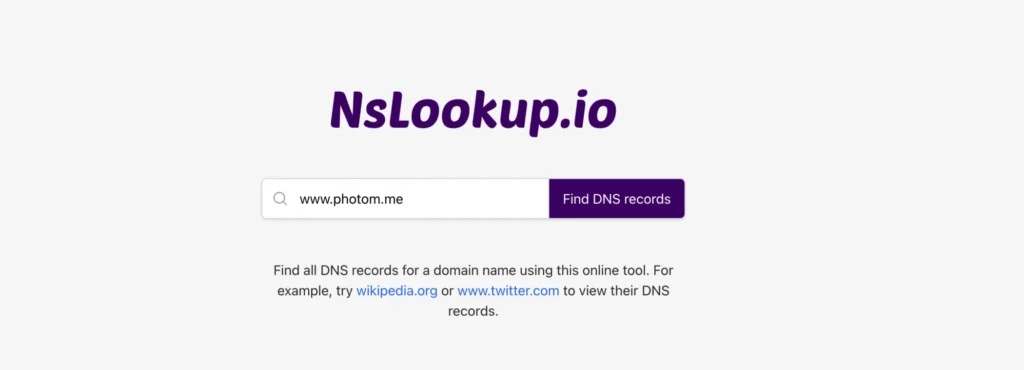
- Go to NSLOOKUP.io
- Enter your domain with www (e.g.,
www.yourdomain.com) - Click Find DNS Records
Verify the results
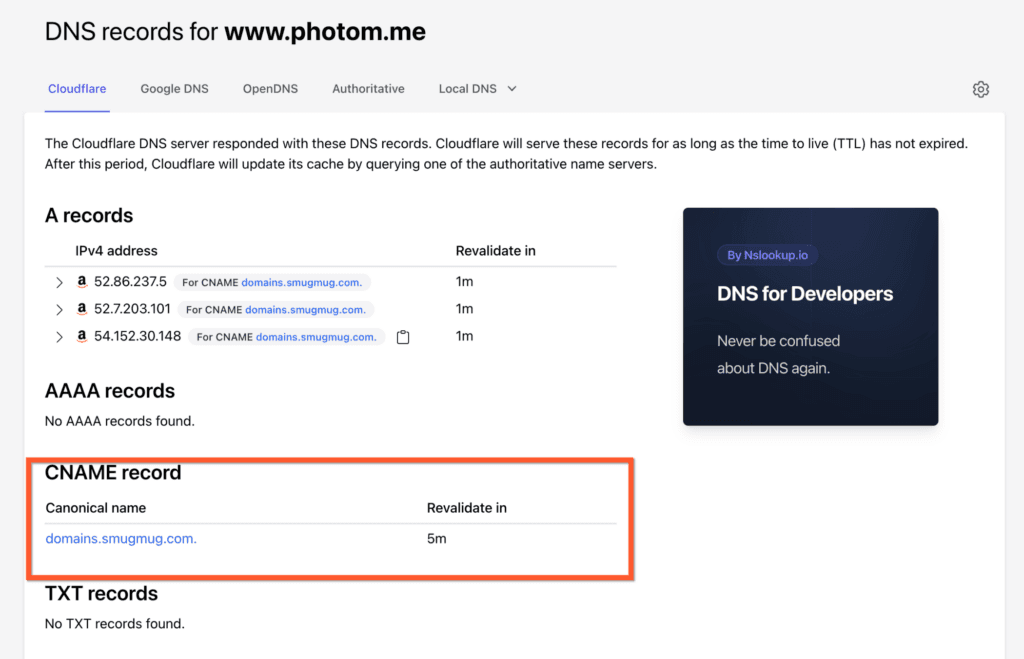
Look for the CNAME record in the results. It should show domains.smugmug.com:
Understanding the results
Correct configuration
If you see:
www.yourdomain.com → domains.smugmug.comYour DNS is configured correctly. If your site still isn't working, contact SmugMug Support.
Incorrect configuration
If you see a different value (or no CNAME record), check your DNS settings at your domain registrar:
- Make sure you're editing the
wwwrecord - Verify you entered
domains.smugmug.comexactly - Ensure there are no typos
- Save your changes and wait for propagation
Different DNS providers have different interfaces, but the settings are the same. Your CNAME record for www must point to domains.smugmug.com — not your SmugMug site address.
Still having issues?
If your CNAME is correct but your domain still doesn't work:
- Clear your browser cache and try again
- Test in an incognito/private browser window
- Try from a different device or network
- Contact SmugMug Support with your NSLOOKUP results