How to Change Buy Button Labels on SmugMug
Customize the text on SmugMug's buy buttons using CSS. Replace "Buy Photos" or "Buy Photo Package" with your own labels like "Shop Now" or "Buy Digital Package".
SmugMug's default button labels like "Buy Photos" and "Buy Photo Package" don't always match your business model. If you sell exclusively digital downloads or want more branded language, you can replace these labels with custom text using CSS.
Change the "Buy Photos" button
The "Buy Photos" button appears at the top of galleries. Here's how to replace it with custom text like "Shop Now":
/* Change the BUY PHOTOS button label */
.sm-gallery-cover-buy-button:after {
    content: 'Shop Now';
}

.sm-gallery-cover-buy-button .sm-button-label {
    display: none;
}
Change the "Buy Photo Package" button
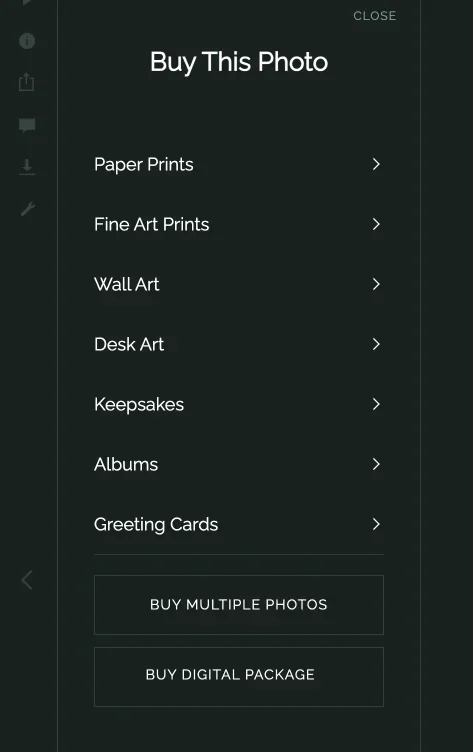
The "Buy Photo Package" button appears in the lightbox when viewing individual photos. To replace it:
/* Change the BUY PHOTO PACKAGE button label */
.sm-com-lb-packages-button span {
    font-size: 0;
}

.sm-com-lb-packages-button span::before {
    content: "BUY DIGITAL PACKAGE";
    font-size: 14px;
}
How the CSS technique works
Both snippets use the same approach:
- Hide the original text — Either set
display: noneorfont-size: 0to make the original label invisible - Add custom text — Use the
::beforeor::afterpseudo-element withcontentto insert your new label - Restore visibility — Set the font size back to a readable value for the new text
Where to add the code
Add a CSS content block to the Entire Site section of your website:
- Click Customize on your SmugMug site
- Select Entire Site in the right panel
- Add a CSS content block
- Paste the code and publish your changes
You can customize the button text to anything you prefer — "Get Prints", "Order Now", "Download Images", or any label that fits your brand.
Customization options
Change the label text
Replace the text inside the quotes:
content: 'Your Custom Label';Adjust the font size
Modify the font-size value to match your theme:
font-size: 16px; /* Larger text */
font-size: 12px; /* Smaller text */How to Add a Blog to Your SmugMug Website
Learn how to create a blog on your SmugMug site using folders and pages. No coding required — just content blocks and the built-in organizer.
How to Create a Full-Screen Custom Slideshow for SmugMug
Build a responsive full-screen slideshow with smooth transitions and a progress bar using HTML and CSS — no JavaScript required.